
- Posted on
Introduction
It happens to thousands of people every single day. You pick up your phone, tap the Facebook icon, and — nothing. A red error message. A "password incorrect" prompt. Or worse: "Your account has been disabled." Your heart drops. Years of memories, friends, business contacts, marketplace listings, groups — all seemingly gone in an instant. But here's what most people don't know: Facebook account recovery is absolutely possible, even in situations that feel completely hopeless. The platform has multiple recovery pathways built in, and knowing which one to use can mean the difference between permanent loss and getting back in within minutes. In this guide, we'll walk you through every single recovery method, ranked from easiest to most complex — so you waste zero time and have the highest possible chance of getting your account back. Let's go.
Why You Lost Access to Your Facebook Account
Before jumping into solutions, let's quickly identify what actually happened — because the recovery method depends entirely on the cause. Common reasons people lose Facebook access:
- Forgotten password — The most common reason, especially if you haven't logged in for a while.
- Changed phone number or email — Your recovery contacts are outdated and Facebook can't reach you.
- Account hacked — Someone changed your credentials, locking you out of your own account.
- Two-Factor Authentication (2FA) locked — You lost access to the device used for 2FA codes.
- Account disabled or suspended — Facebook flagged your account for violating community standards.
- Account memorialized — Rare, but sometimes accounts are incorrectly marked as belonging to a deceased person.
Knowing your situation helps you skip straight to the right solution. Let's cover them all.
Method 1: Reset Your Password (The Easy Fix)
If you still have access to the email or phone number linked to your account, this is your fastest route back. Steps:
- Go to facebook.com/login and click "Forgot password?"
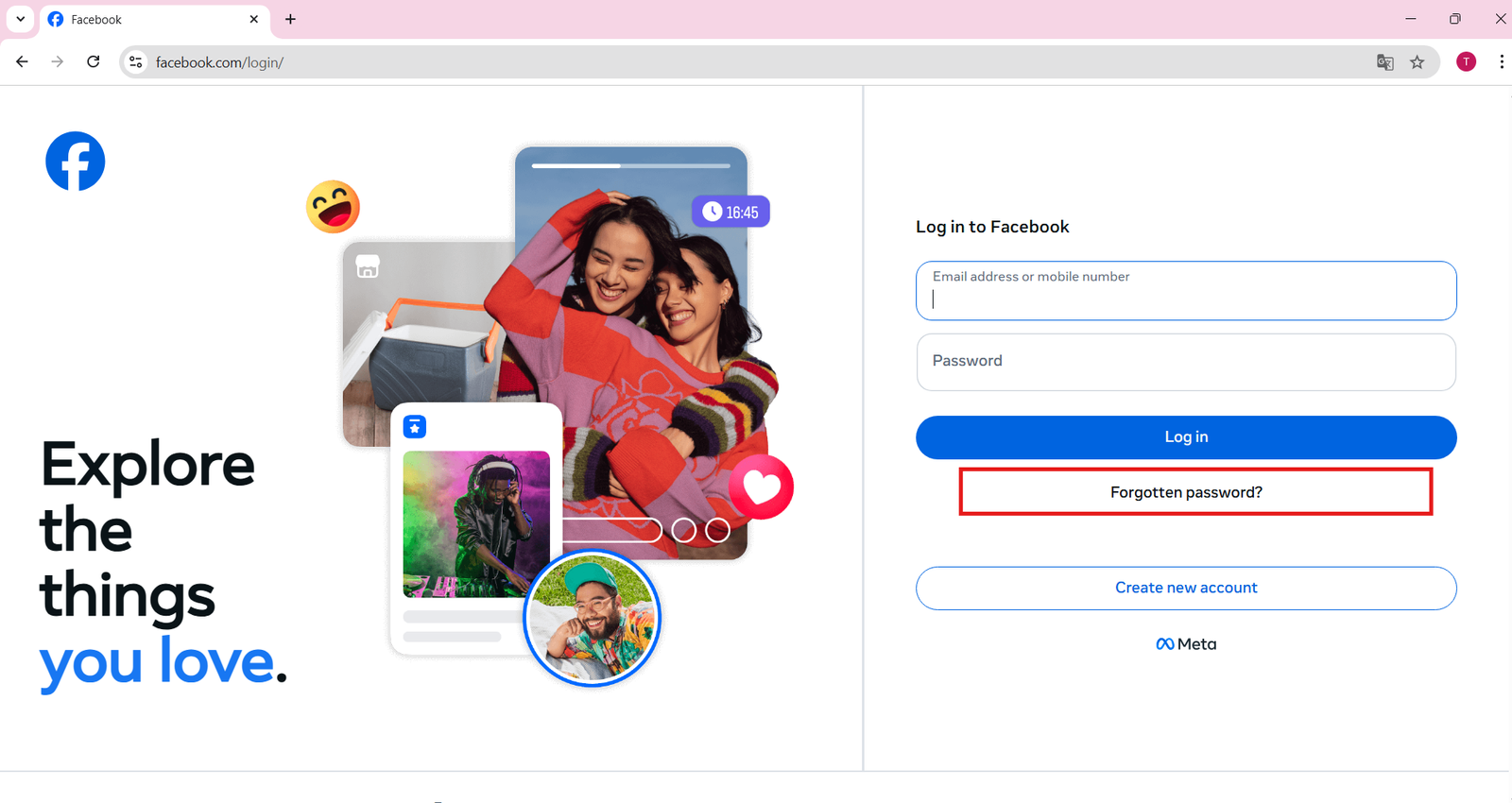
- Enter your email address, phone number, username, or full name.
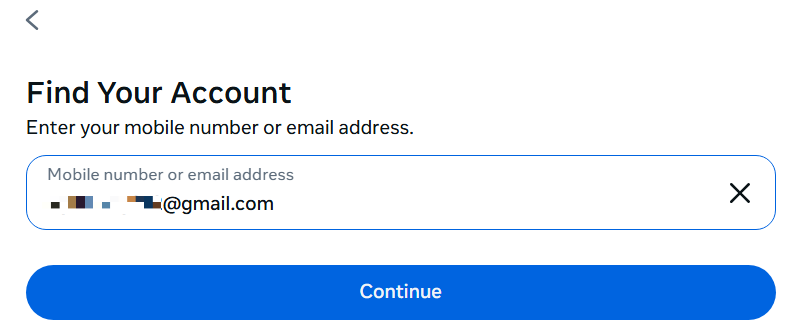
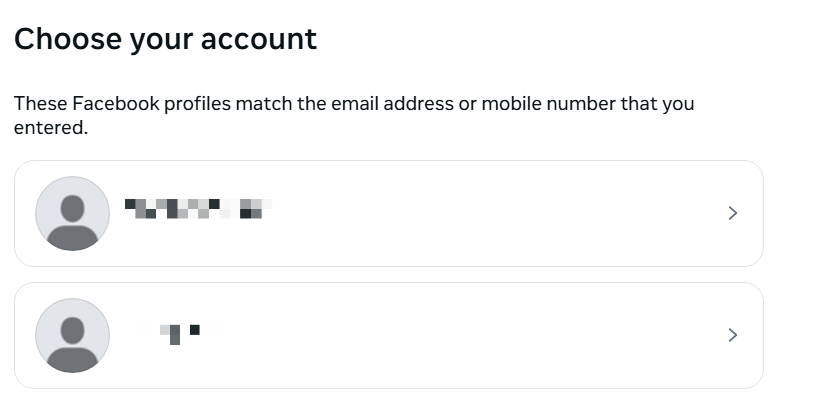
- Facebook will find your account — select it when it appears.
- Choose where to receive your reset code: email or SMS.
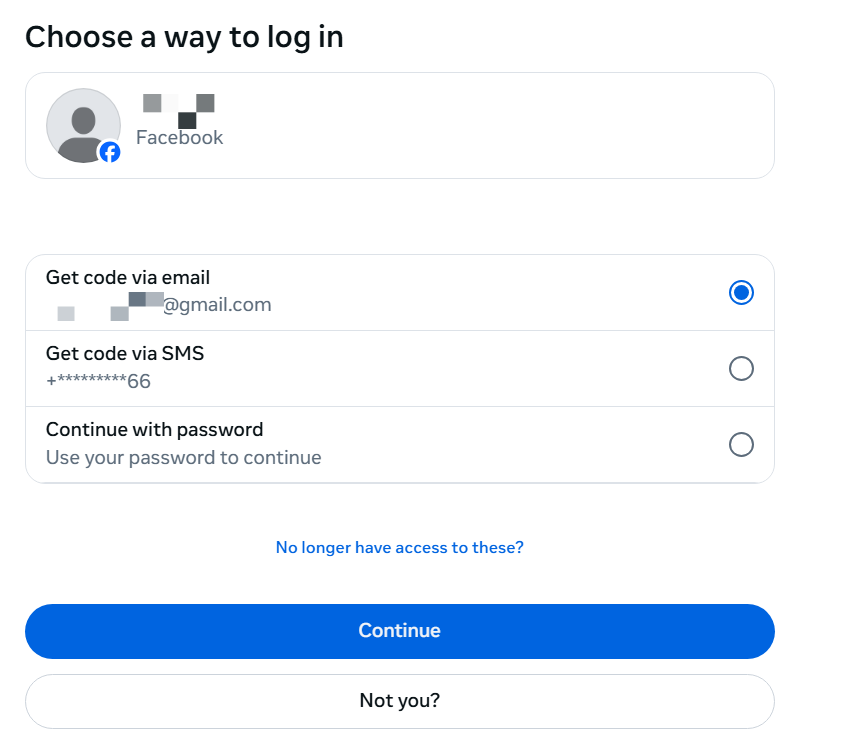
- Enter the 6-digit code you receive.
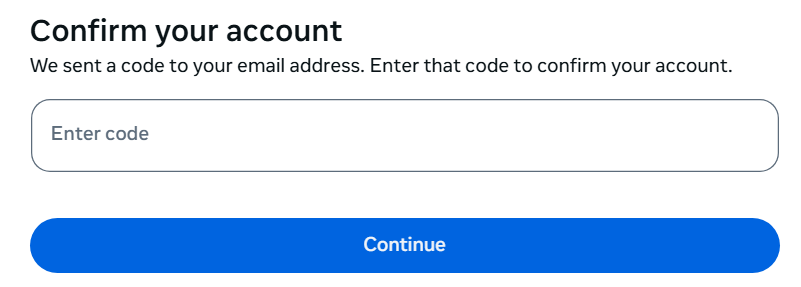
- Create a new, strong password.
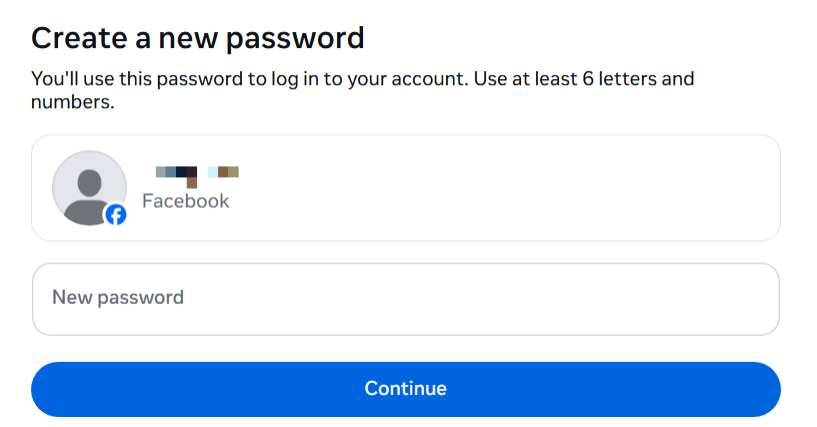
- Log in and immediately update your security settings.
Pro tip: Once you're back in, go to Settings > Security and Login and review all active sessions. Log out of any devices you don't recognize.
Method 2: Recovery via Trusted Friends (Facebook's "Trusted Contacts" Feature)
Did you set up Trusted Contacts before losing access? This underused feature is a lifesaver. Steps:
- On the login page, click "Forgot password?"
- After finding your account, scroll down and click "No longer have
access to these?"
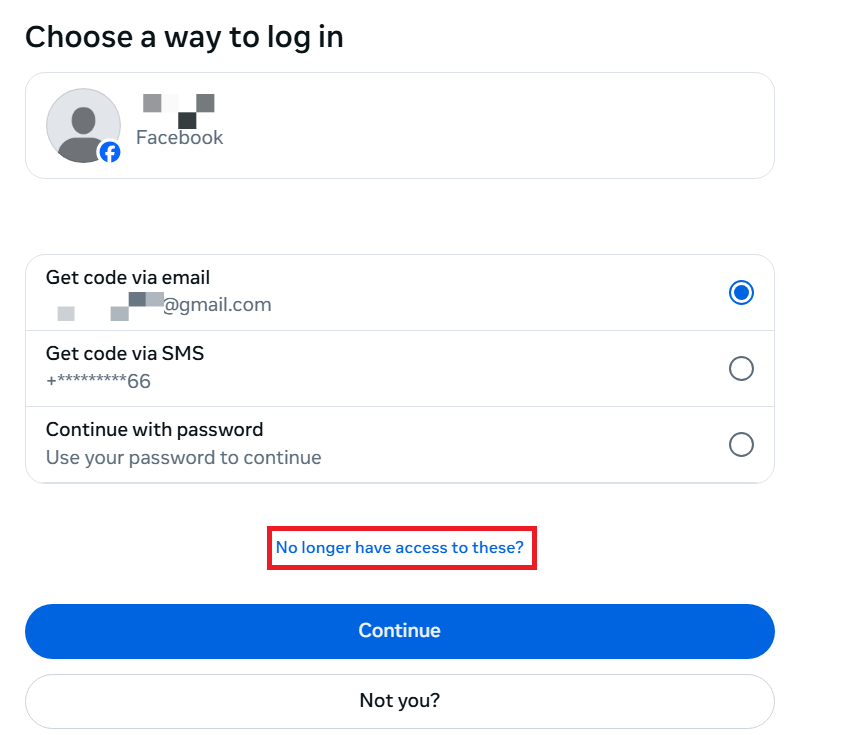
- Select "Reveal my trusted contacts"
- Enter the full name of one of your trusted contacts.
- Facebook will display a recovery URL — you'll need to call or message your trusted contact to visit that URL and retrieve a code for you.
- Use the code to regain access.
Didn't set up Trusted Contacts? You can set them up now for the future at: Settings > Security and Login > Choose 3 to 5 friends to contact if you get locked out.
Method 3: Identity Verification (When You Have No Email or Phone Access)
This is where most tutorials fail you. If your email and phone are both inaccessible, don't panic — Facebook has a manual identity verification process. Steps:
- Go to facebook.com/login → "Forgot password?"
Enter your name or username to locate your account.
Click "No longer have access to these?"
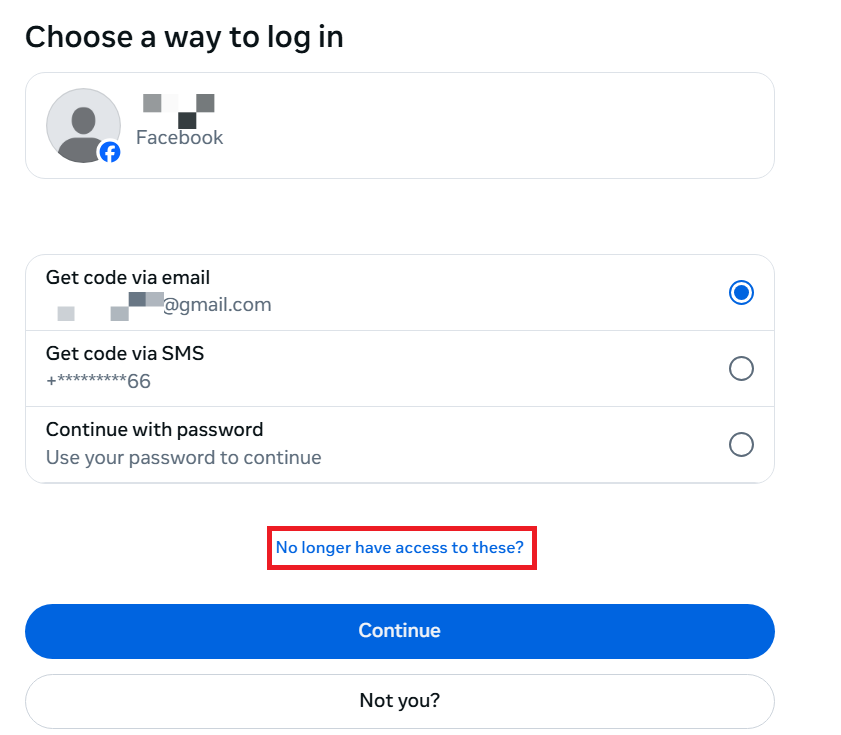
- Select "I don't have access to these anymore"
- Facebook will ask you to verify your identity by submitting a government-issued photo ID (passport, driver's license, national ID).
- Upload a clear photo of your ID.
- Facebook's team will review your submission (this can take 24–72 hours).
- You'll receive an email from Facebook at a new address you specify, with recovery instructions.
Important: Make sure the name on your ID matches the name on your Facebook account. Discrepancies slow down or block the process.
Method 4: Recovering a Hacked Facebook Account
This is arguably the most stressful scenario — someone else is actively using your account. Move quickly. Steps:
- Visit facebook.com/hacked — this is Facebook's official hacked
account portal.
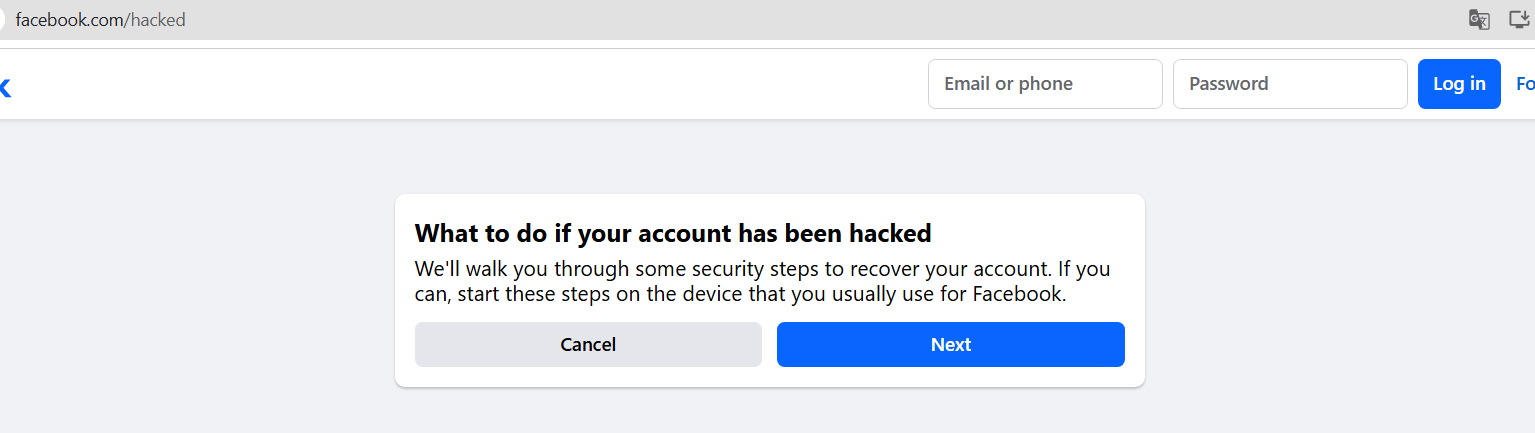
- Click "My Account Is Compromised"
- Enter your email, phone number, or username.
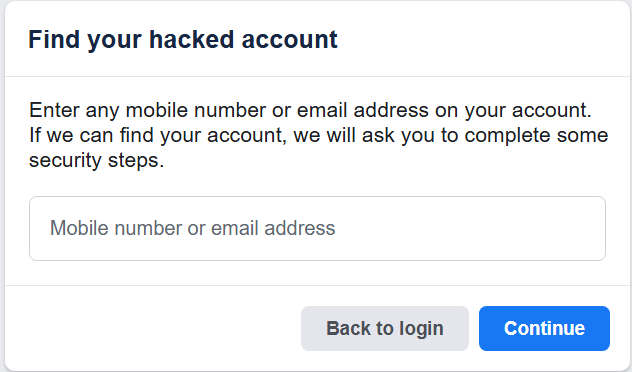
Facebook will ask you to verify your identity.
Once verified, you'll be prompted to secure your account — change your password immediately.
- Review and remove any unrecognized apps, devices, or email addresses that the hacker may have added.
- Enable Two-Factor Authentication (2FA) right away.
If the hacker changed your email and phone number: Use the identity verification method above (Method 3), but also report it to Facebook directly using their hacked account support page and select the option that reflects your specific situation.
Method 5: Recovering a Disabled Facebook Account
Nothing is more alarming than the message: "Your account has been disabled." Facebook typically disables accounts for:
- Posting content that violates Community Standards
- Using a fake name
- Suspicious activity or spam behavior
- Multiple reports from other users
Here's how to appeal:
- Visit https://www.facebook.com/help/103873106370583 — Facebook's official disabled account appeal form.
- Fill in your full name, email associated with the account, and a detailed explanation.
- You may be asked to submit a photo ID to verify your identity.
- Submit the form and wait for Facebook's response via email (can take 1–7 business days).
Tips to strengthen your appeal:
- Be polite and professional in your explanation.
- If you believe the disabling was a mistake, clearly state that.
- If you did violate a rule, acknowledge it and explain that you've understood the policies.
- Follow up if you don't hear back within a week.
Method 6: Recovering an Account Without Any Access to Email or Phone
This is the hardest scenario, but it's not impossible. Here's a combination approach that gives you the best odds: Step 1: Try logging in on a device where you were previously logged in (old phone, laptop, tablet). If Facebook still has an active session, you can change your password from within the app without verification. Step 2: Check if you're still logged into Facebook via a linked app — like Instagram, Spotify, or games that used "Login with Facebook." Some allow you to access and update account settings indirectly. Step 3: If all else fails, use the Identity Verification method (Method 3) with a government ID. Step 4: Contact Facebook Support directly via their Help Center chat (available to some users based on region and account type).
How to Prevent This From Ever Happening Again
Getting your account back is one thing. Keeping it secure is another. Here's your post-recovery checklist:
✅ Security Checklist After Recovery
- Change your password to something unique (use a password manager).
- Enable Two-Factor Authentication (2FA) — use an authenticator app, not just SMS.
- Update your recovery email and phone number to ones you actively use.
- Set up Trusted Contacts — choose 3–5 real-life friends you can reach.
- Review active sessions and log out of all unrecognized devices.
- Check connected apps and revoke access for anything suspicious.
- Set up login alerts so Facebook notifies you of any new sign-ins.
All of these settings live in: Settings & Privacy → Settings → Security and Login
Frequently Asked Questions
Q: How long does Facebook account recovery take? It depends on the method. Password resets are instant. Identity verification can take 24–72 hours. Disabled account appeals can take 1–7 business days. Q: Can I recover a Facebook account that was deleted? If it was deactivated, yes — simply log back in and it will be restored. If it was permanently deleted and more than 30 days have passed, unfortunately it cannot be recovered. Q: What if Facebook keeps saying my email isn't recognized? This may mean the hacker changed your email, or the account was registered under a different address. Use the "Find your account" tool with your phone number or full name instead. Q: Is there a Facebook support phone number I can call? Facebook does not offer phone support for personal accounts. All recovery is handled through their online Help Center and support forms. Q: My account got hacked and the hacker set up 2FA. Can I still recover it?
Yes. Facebook's identity verification process (submitting a government ID) can override 2FA in hacked account cases. Visit facebook.com/hacked to begin.
Final Thoughts
Losing access to your Facebook account feels devastating — but it's rarely permanent. Facebook has built multiple recovery pathways for exactly this reason, and millions of people successfully get their accounts back every year.
The key is knowing which method matches your situation, moving quickly when it comes to hacked accounts, and being patient with the identity verification and appeals processes.
Once you're back in, take 10 minutes to lock down your security settings. Future you will be grateful.
Did this guide help you recover your account? Share it with someone who's been locked out — you might just make their day. And if you have questions about your specific situation, drop them in the comments below.